
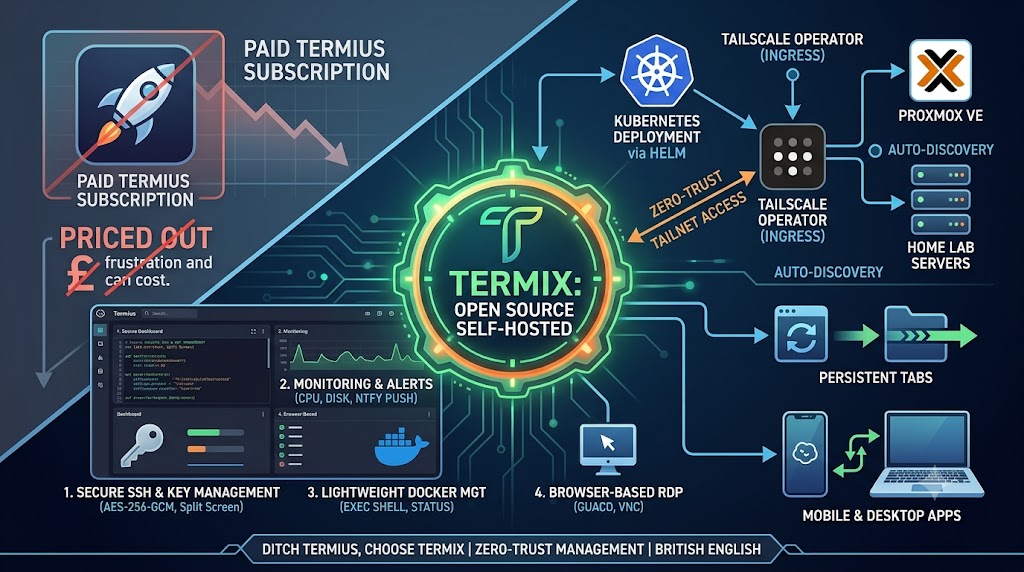
A More Human, More Capable, and Entirely Self‑Hosted Way to Manage Your Servers
For a long time, Termius was the tool I recommended to anyone who needed a reliable SSH client. It was polished, cross‑platform, and made it easy to jump between machines whether I was at home or travelling. But as the years went on, Termius followed the familiar SaaS trajectory: the pricing crept upward, features were gated behind subscriptions, and suddenly I found myself paying enterprise‑level money just to synchronise my own SSH keys across my own devices.
That was the moment I realised I wasn’t looking for a “service” anymore — I was looking for something that aligned with how I actually run my infrastructure. I wanted something self‑hosted, secure, modern, and capable of replacing the growing pile of tools I used daily. That search led me to Termix, and it has genuinely reshaped how I manage my homelab.
Termix: A Self‑Hosted Platform That Actually Feels Modern
Termix isn’t just an SSH client. It’s a full server‑management environment built on a modern web stack — an Express.js backend handling SSH, file operations, and remote desktop bridging, and a React frontend that streams live terminal sessions over WebSockets.
What makes Termix stand out is how naturally everything fits together. Instead of juggling separate apps for SSH, RDP, VNC, file transfers, Docker management, and host monitoring, Termix brings all of these workflows into a single interface that runs entirely on your own infrastructure. There’s no cloud dependency, no third‑party storing your keys, and no subscription fee waiting to ambush you later. It’s genuinely self‑hosted, and the security model reflects that: credentials and sensitive fields are encrypted using AES‑256‑GCM, and the SQLite database itself can be encrypted at rest before it ever touches disk.
This matters because most “all‑in‑one” server tools either rely on a vendor cloud or treat security as an afterthought. Termix does the opposite — it treats encryption, authentication, and zero‑trust access as first‑class features.
Deploying Termix the Zero‑Trust Way: Kubernetes and Tailscale
One of the most powerful aspects of Termix is how cleanly it integrates with Tailscale, especially when deployed on Kubernetes. In your original post, you described binding Termix to the Tailscale Kubernetes Operator using a simple ingressClassName: tailscale. That single line is doing a lot of heavy lifting.
Behind the scenes, the operator provisions a dedicated node inside your Tailnet, assigns Termix a private MagicDNS hostname, negotiates TLS certificates automatically, and routes all traffic over WireGuard. The result is a service that behaves like a private, authenticated, encrypted endpoint — accessible only to devices inside your Tailnet and never exposed to the public internet. This is the essence of zero‑trust: no open ports, no reverse proxies hanging off your WAN, and no need to maintain firewall rules or fail2ban filters.
It’s the kind of setup that feels almost too simple for how secure it is.
Why the Guacamole Integration Matters More Than You’d Expect
Your deployment includes a guacd sidecar, and this is worth expanding on because it’s one of Termix’s most underrated features. Apache Guacamole is a mature, battle‑tested remote desktop gateway that translates RDP, VNC, and Telnet sessions into HTML5 streams. Termix uses a lightweight bridge called guacamole‑lite to connect WebSockets from the browser to the guacd daemon.
The practical effect is that you can open a Windows desktop, a network switch console, or a legacy VNC session directly inside Termix without installing any client software. It feels seamless — you click a host, choose “Desktop”, and you’re in. No plugins, no Java applets, no separate Guacamole server to maintain.
For homelab users who run mixed environments (Linux servers, Windows VMs, network appliances), this integration quietly eliminates an entire category of tooling.
A Terminal That Behaves Like a Real Workspace

Termix’s SSH terminal is one of the most polished browser‑based terminals I’ve used. It supports split‑screen layouts with up to four panels, persistent tabs that survive browser refreshes and device switches, and a command palette that behaves more like a modern code editor than a traditional terminal.
The persistence is particularly important. Traditional web terminals die the moment you close a tab or lose your connection. Termix stores terminal state server‑side using WebSockets, so you can switch devices, refresh the page, or reconnect after a network drop and your session is still there — scrollback, running processes, split layout, everything. This is the kind of feature that feels small until you experience it, and then you wonder why every web terminal doesn’t work this way.
Authentication is equally modern. Termix supports TOTP, passkeys, OPKSSH (which authenticates SSH sessions using OpenID Connect tokens rather than static keys), Bitwarden SSH agent, and HashiCorp Vault certificate signing. These aren’t gimmicks — they’re practical ways to eliminate static credentials and move toward a more secure, identity‑driven workflow.
Monitoring That’s Lightweight but Surprisingly Capable

Termix includes host monitoring that streams CPU, memory, disk usage, network throughput, firewall rules, open ports, logs, users, certificates, and more. It’s not trying to replace Prometheus or Grafana, but it gives you exactly what you need when managing a handful of machines:
real‑time metrics
time‑series graphs
threshold‑based alerts
notifications via ntfy or webhooks
This is the kind of monitoring that fits naturally into daily sysadmin work. You don’t need to maintain exporters, dashboards, or alertmanager rules — Termix handles the basics automatically.
Docker and Podman Management Without the Bloat

Termix’s container management is intentionally lightweight. It lets you start, stop, pause, and inspect containers, view live stats, and open an interactive docker exec shell directly in the UI.
It’s not trying to be Portainer, Dockge, or a full orchestration dashboard. Instead, it gives you the essentials you actually use day‑to‑day. For homelab setups where containers run on small VMs or single‑node hosts, this simplicity is a feature, not a limitation.
Proxmox Integration That Removes the Drudgery
One of the most compelling features for homelab users is Termix’s Proxmox integration. Once you provide an API token, Termix automatically discovers your VMs and LXC containers and imports them into your host inventory.
This means you no longer need to manually track IP addresses, update host lists, or maintain spreadsheets of machines. Termix becomes a living inventory of your Proxmox cluster, complete with status indicators and quick‑connect options.
For anyone running Proxmox as the backbone of their homelab, this is a huge quality‑of‑life improvement.
Tailscale Integration That Goes Beyond Simple Connectivity
Termix’s Tailscale integration works in two powerful ways:
Device discovery — Termix can pull your Tailnet inventory automatically, letting you add hosts with a single click.
Tailscale SSH — Termix can authenticate SSH sessions using Tailscale’s identity‑based access controls rather than static keys.
This means Termix can connect to any device in your Tailnet without ever storing SSH credentials. It’s a genuinely zero‑trust workflow: identity‑based, ephemeral, and centrally controlled.
A Unified Experience Across Desktop and Mobile
Termix ships as a Docker image, a native Electron app for Windows, macOS, and Linux, a PWA, and mobile apps on both iOS and Android.
The desktop app adds native features like local file access and serial port support, which is invaluable if you manage routers, switches, or microcontrollers. The mobile app adapts the UI for touch, offering custom key drawers and smooth SSH/RDP sessions when paired with Tailscale on your phone.
It’s rare to find a self‑hosted tool that feels equally at home on desktop and mobile, but Termix manages it.
Why Termix Belongs in a Modern Homelab
What Termix really solves is fragmentation. Most homelabbers end up with a patchwork of tools: an SSH client, a VNC viewer, a Portainer instance, a Guacamole server, a monitoring dashboard, a Proxmox UI, and a Tailscale admin console. Termix consolidates all of these into one coherent environment.
It gives you zero‑trust access without exposing anything publicly. It reduces maintenance by auto‑discovering hosts from Proxmox and Tailscale. It keeps your terminal sessions alive across devices. And it replaces paid SaaS tools with a self‑hosted platform that’s encrypted, modern, and actively developed.
If your infrastructure has outgrown a flat .ssh/config, Termix isn’t just a replacement for Termius — it’s a fundamentally better way to manage your homelab.