
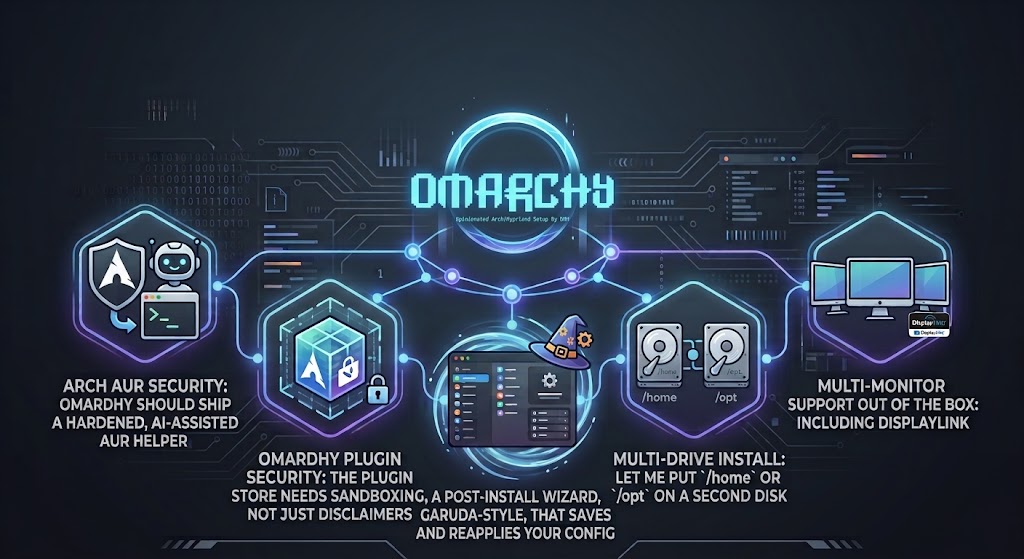
Or: five improvements that would turn my favourite Arch distro into the one I’d install on every machine I own.
What Omarchy actually is
Omarchy is an opinionated, Arch-based Linux distribution built by David Heinemeier Hansson — DHH, the creator of Ruby on Rails and co-founder of 37signals. The name is a portmanteau of omakase (the Japanese “chef’s choice” dining concept) and Arch, and that framing is the whole pitch: instead of spending three weekends hand-assembling a tiling window manager, a status bar, a launcher, a notification daemon, a lock screen and a sensible set of dotfiles, you trust a curated setup that someone who lives in this stack every day has already made coherent. The foundation is Arch Linux for rolling updates and the AUR, Hyprland as the Wayland tiling compositor, and — since the Quattro (4.0) release in August 2026 — a single Quickshell process that folds the bar, launcher, menus, notifications, on-screen display, lock screen and polkit agent into one plugin-based shell. The GitHub repository sits at over 28,000 stars, and the project is now backed by the Omacom Foundation, seeded with roughly $15 million from patrons including Shopify’s Tobi Lütke, Stripe’s Patrick Collison, Dell’s Michael Dell and Cloudflare’s Matthew Prince.
What makes Omarchy genuinely different from most distributions is that it treats a Linux install as mutable state that two parties co-own — the distribution, which keeps shipping new opinions, and you, who keeps editing the files those opinions live in — and manages that with a migrations runner borrowed straight from Rails’ schema-migration playbook. /usr/share/omarchy/ belongs to the package; ~/.config/ belongs to you, and because Hyprland now takes Lua, your config file calls theirs rather than forking the defaults. omarchy update snapshots the root filesystem, updates packages, runs idempotent per-user migrations, and wraps the whole thing in a transaction with a boot-menu rollback. Raw pacman and yay are deliberately blocked so snapshots and migrations can’t be bypassed. That is a fundamentally different contract from EndeavourOS (“here’s a near-vanilla Arch, good luck”) or Manjaro (“we hold packages back a few weeks and ship a GUI”), and it’s the reason an Omarchy machine installed in 2024 doesn’t slowly fossilise into a museum of that year’s defaults.
It’s also why Omarchy is currently dominating the social-media and YouTuber press in a way no Arch derivative has managed before. NetworkChuck’s 33-minute “this is the OS for the agentic AI age” video sat at over 430,000 views within days and the comment sections across every coverage piece are full of people deciding which machine to wipe. The hook is that Omarchy ships AI coding agents — Claude Code, Codex, OpenCode, Gemini, Grok, Copilot and others — as lazy-loaded first-class citizens, and a built-in system agent can re-theme the desktop, walk a core dump after a crash, or edit your Hyprland config on request. That, plus sub-minute installs on modern hardware, dual-boot support, a factory-reset mechanism, and a Dell partnership for Day-One Linux on the XPS 14 and 16, has produced the rarest thing in Linux desktop discourse: genuine momentum. CachyOS owns the “Arch for speed” lane; Omarchy owns “Arch for the agentic era,” and Ubuntu and Fedora are visibly scrambling to claim the same territory.
Why I enjoy using it
I’ll be honest: I came to Omarchy from the usual home-lab sprawl of a self-hosted Debian box, a Proxmox cluster, and a desktop that had been “temporarily” running a half-broken GNOME extension set for two years. Omarchy was a genuine breath of fresh air. The tiling workflow took about a week to internalise, and once it clicked, the mouse mostly gathered dust — one workspace for SSH sessions into the Proxmox nodes, another for dashboards, another for Git and Ansible, another for documentation. The terminal is treated as a primary interface rather than an afterthought, and the bundled modern CLI tooling (fzf, ripgrep, zoxide, eza, bat, lazygit, lazydocker) means the commands I actually use to run my homelab are already there. Docker ships configured sensibly — your user isn’t dumped in the docker group by default, which is the right security call — and Tmux is wired in as a first-class persistence layer so a dropped SSH session mid-upgrade doesn’t kill a pve8to9 --full.
The theming story is the other thing that surprised me. Twenty-four themes, cross-application sync across the terminal, Neovim, btop, Chromium and the entire shell, and a colors.toml-driven generation pipeline means I can make the desktop look like something out of a film in about ten seconds. The btrfs + Snapper + Limine rollback combination makes rolling-release Arch feel safe in a way it never did when I ran bare Arch — a bad package is a boot-menu entry away from undone. And the AI integration, which I expected to be gimmicky, has been quietly useful: crash diagnosis that walks a core dump and offers to report it, and a coding-agent launcher that actually fits how I work on infrastructure-as-code. After years of desktop Linux feeling like a chore I tolerated because the server side was worth it, Omarchy is the first distro in a long time that made me want to sit down at the desktop machine.
None of that is to say it’s finished. The opinionated approach is a strength, but it also means the places where the opinions stop short are more obvious — and as someone who runs a homelab, self-hosts half a dozen services, and has more than one disk in the case, I’ve hit every one of them. What follows are the five changes I’d most like to see. They’re written as constructive criticism from a user who wants the project to succeed, not a list of grievances, and where I can see a plausible way to implement them I’ve sketched it out.

1. Arch AUR security — Omarchy should ship a hardened, AI-assisted AUR helper
The AUR is the single best and single most dangerous thing about running Arch. It’s a repository of user-submitted build recipes that execute arbitrary code on your machine as your user during makepkg, before pacman ever sees a package, and there is no review gate equivalent to Debian’s maintainer process or even Fedora’s packaging guidelines. This is not a theoretical concern: in July 2025 the firefox-patch-bin, librewolf-fix-bin and zen-browser-patched-bin packages shipped a source=() entry disguised as “patches” that pulled a personal GitHub repo and ran CHAOS RAT at build time, and they stayed live for roughly 46 hours. Then in June 2026 the “Atomic Arch” campaign saw attackers adopt over 1,500 orphaned AUR packages and add post-install steps running npm install atomic-lockfile and bun install js-digest, which pulled a Rust credential stealer and — when built as root — an eBPF rootkit, with some attackers using git commit forgery to impersonate a trusted maintainer. The package name and history were unchanged; only the build instructions, and who wrote them, had quietly changed. For a homelabber running yay -Syu across dozens of AUR packages on a machine that also holds SSH keys and Proxmox tokens, that is a serious attack surface.
The good news is that a whole tier of community tooling has appeared to address this, and the state of the art in 2026 is genuinely impressive. Static-rule scanners like aur-scanner ship 110+ detection codes derived from real incidents. LLM-assisted tools like aurscan (manticore-projects, 113 stars) and aur-sleuth hand the PKGBUILD and downloaded sources to a model alongside static rule hits and AUR reputation signals, and block the build if the verdict is hostile — with the static rules failing closed even fully offline. Wrappers like safeyay layer ClamAV signature scanning, static rules and an AI review into independent passes before makepkg runs a single line. The crucial design insight all of them share is interception point: a pacman PreTransaction hook is the wrong layer because build-time payloads have already executed by the time pacman sees the package, so the scan must happen after download and before build. None of this is integrated into a distribution, though — it’s all opt-in community packages that the average user will never install.
Omarchy is uniquely positioned to fix this because it already controls the update pipeline (the ALPM guard that forces upgrades through omarchy update) and already ships AI agents as first-class citizens. The move I’d like to see is a hardened fork of yay or paru — call it ompkg or similar — that is the default AUR path on Omarchy and bakes in the defence-in-depth stack: offline static rules that fail closed, an optional LLM judgement pass using whatever agent the user has configured as their default (Claude, Codex, a local Ollama model), AUR reputation enrichment (maintainer age, orphan-takeover detection, the Arch compromised-package denylist), and a supply-chain diff that flags new suspicious lines on a previously-clean package. Pin it to fail-closed by default, surface a Continue with this suspicious package? [y/N] prompt, and cache verdicts per-bundle so a single yay -S foo doesn’t re-prompt four times. The engineering is mostly already written by the community; what’s missing is a distribution willing to ship it as the default rather than a wiki footnote, and Omarchy — with its funded foundation and its opinionated stance on the update contract — is the obvious candidate.

2. Plugin security — the plugin store needs sandboxing, not just disclaimers
Omarchy 4.0’s plugin system is one of its best features: third-party bar widgets, full replacement bars, and shell extensions load from Git repositories and can be enabled, disabled, cloned or removed through the configuration interface. It’s the mechanism that lets the community ship new widgets and workspace scripts at the pace the project is moving, and it’s a big part of why the desktop feels so alive. It is also, frankly, every bit as worrying as the AUR — and for the same reason: a plugin is arbitrary code that runs as your user, inside the shell process, with access to your filesystem, your IPC sockets, your network and your environment variables. The plugin store pages carry disclaimers to that effect, and those disclaimers are honest, but a disclaimer is not a control. If a popular plugin author’s GitHub account is compromised, or a maintainer turns malicious, or a dependency of a dependency gets hijacked, the update path delivers the bad code straight into a process that runs for your entire login session.
The supply-chain exposure is actually worse than the AUR’s in one specific way: AUR packages build once and install a static artefact, so you can at least diff the PKGBUILD between versions. A plugin cloned from main of a Git repo and hot-reloaded on save can change behaviour between the moment you install it and the moment you next reboot, with no checkpoint and no audit trail. For a homelabber whose desktop machine also holds Tailscale state, Docker socket access, SSH keys and Ansible vaults, “the bar widget can read my environment” is not a theoretical risk. The current mitigation — “only install plugins you trust” — is the same mitigation the AUR offers, and the AUR’s track record shows exactly how far that gets you at scale.
What I’d like to see is real sandboxing rather than prose. Quickshell plugins should run in a restricted context: a bubblewrap or namespace wrapper that limits filesystem access to an explicit allowlist, seccomp filters that block unexpected syscalls, and scoped IPC so a weather widget can’t read a notifications plugin’s message history. On the distribution side, Omarchy could borrow the AUR’s Trusted User model: signed plugin manifests, reproducible builds, a review queue for the plugin catalogue, and per-plugin update diffs surfaced in the menu before you accept an update — the same “show me what changed” affordance that aur-guard and traur give you for PKGBUILDs. None of this is cheap, and it’s a bigger lift than the AUR-helper change, but the Omacom Foundation’s funding exists precisely for this kind of unglamorous infrastructure work, and getting out ahead of the inevitable plugin-store incident is worth a lot more than a disclaimer page.

3. Multi-drive install — let me put /home or /opt on a second disk
The Omarchy installer is a genuine achievement: full-disk encryption by default, sub-minute installs on modern hardware, a dual-boot free-space option, and a factory-reset mechanism for machines being handed on. For a single-drive laptop it’s about as good as an installer gets. The problem is that it assumes one drive, and a surprising number of us don’t have one drive. My desktop has two NVMe disks; plenty of homelab workstations have an SSD for the system and a larger NVMe or SATA for data. Right now the only way to get /home onto the second disk is to install to the first, then manually partition, format and mount the second, move the home directory, edit fstab, regenerate the initramfs and hope the snapshot/rollback story still makes sense. That’s exactly the kind of tedious, error-prone manual intervention that Omarchy exists to eliminate.
What I’d like is a second screen in the inst2. Plugin security — the plugin store needs sandboxing, not just disclaimersaller — “Advanced storage” — that lets you pick a second disk, choose a mountpoint (/home, /opt, /var/lib/docker, /data), format it with your filesystem of choice (btrfs with subvolumes to match the root, or ext4 for simplicity), and encrypt it with LUKS so it unlocks at boot alongside the root passphrase. The installer already knows how to do LUKS and btrfs for the root disk; extending it to a second partition is mostly UI plumbing and an extra crypttab entry. The interesting design question is how it interacts with the rollback story, because the manual is admirably honest that a snapshot restore covers the root filesystem but not /home — so a user who puts /home on a separate disk needs to understand that rollback won’t touch it, and the installer should say so explicitly at the point of choice rather than burying it in the docs.
For the self-hosted and homelab audience specifically, the common pattern is a fast disk for the OS and a larger, possibly slower disk for /var/lib/docker, media, or backups — and having that be a first-class installer option rather than a post-install shell session would save a lot of people from a poorly-mounted /home that they’ll be too lazy to fix for three years. It also plays well with Omarchy’s existing btrfs + Snapper infrastructure: a second btrfs disk can have its own subvolumes and snapshot timeline, and the migrations runner already understands per-user state. This is the lowest-effort, highest-impact change on the list, and it would make Omarchy viable for a class of desktop machines it currently awkwardly fits.

4. Multi-monitor support out of the box — including DisplayLink
Hyprland’s multi-monitor story on native outputs is genuinely good — HiDPI, scaling, per-monitor workspaces and arrangement all work, and the Quattro display panel lets you arrange monitors without reaching for a config file. The gap is DisplayLink, which is how a large minority of homelab and office setups drive extra monitors over a USB-C dock. The ArchWiki still describes DisplayLink on Linux as “experimental support,” and the Hyprland-specific reality is that it works for many people but is fiddly: you need evdi-dkms and displaylink from the AUR, the displaylink.service enabled, matching linux-headers for DKMS, and historically a patched Hyprland or an Aquamarine workaround because DisplayLink presents as a render-less GPU. Hotplug is unreliable enough that the common advice is “reboot with the dock connected.” None of that is Omarchy’s fault, but it is Omarchy’s problem, because a user who plugs in a dock and gets a black screen blames the distro, not wlroots.
What I’d like is a first-class “Enable multi-monitor” toggle — reachable from the Setup menu — that detects a DisplayLink device (or lets you opt in proactively), installs the evdi-dkms + displaylink AUR packages with the right headers for the running kernel, enables the service, and configures Hyprland’s WLR_DRM_DEVICES so the iGPU renders and the DisplayLink outputs only display. Pair it with a monitor-arrangement plugin or wizard: a GUI that identifies monitors by their description (not the volatile connector name), lets you order, rotate, scale and pick a primary, and saves a profile keyed to the set of connected monitors so hotplug just re-applies the right layout. The community has already built exactly this pattern — AlejandroMinor’s HyprFlow monitors.sh wizard and my own omarchy_setup both demonstrate the description-keyed-profile approach — so the precedent exists.
The honest caveat is that some of this is upstream of Omarchy: DisplayLink hotplug reliability is an evdi/Aquamarine issue, and NVIDIA + DisplayLink on a hybrid laptop is a known pain point. But Omarchy doesn’t have to solve the kernel problem to dramatically improve the experience — it can ship the installer glue, the service management, the WLR_DRM_DEVICES pinning and the arrangement wizard, and leave a clear “if your dock misbehaves, reboot with it connected” note. That alone would take multi-monitor from “I’ll spend an evening on the ArchWiki” to “toggle, reboot, arrange,” which is the gap between Omarchy’s promise and its current delivery for anyone not on a single laptop screen.

5. A post-install wizard, Garuda-style, that saves and reapplies your config
This is the one I feel most strongly about, possibly because I’ve already half-built it. Garuda Linux ships a Setup Assistant that runs on first boot, walks you through updating the system, and then presents categorised software selections — printers, browsers, dev tools, GPU drivers, kernels — as checkboxes that install and auto-enable the right systemd services. It’s not glamorous, but it solves a real problem: a fresh install goes from “blank slate” to “my machine” in one guided pass, and you can re-launch it from the Garuda Toolbox later when you remember you need something. Omarchy’s Super + Space menu and omarchy install commands cover the individual actions, but there’s no guided first-boot flow and no notion of “save my customisations and replay them on the next box.”
I’ve written a proof of concept for exactly this at github.com/mightywomble/omarchy_setup. It’s a snapshot of one machine’s customisations against the Omarchy defaults — keybindings, Hyprland config, theme, bar layout, fifteen third-party plugins, GloView, dotfiles, and the package delta (what I removed, what I added from the official repos, what I added from the AUR) — plus a apply.sh script that re-applies them fully, selectively, or from a saved JSON config, with a GTK4/libadwaita wizard GUI that styles itself to the active Omarchy theme. Categories run in a fixed dependency order (packages → plugins → theme → hyprland → keybindings → barconfig), every write backs up the destination first, and it’s idempotent so you can run it on a fresh install or an existing one. It exists because I got tired of re-doing the same two hours of customisation every time I rebuilt the desktop, and it works.
What I’d like is for Omarchy to ship something like this as a first-class part of the distribution rather than a community side-project. The pieces are already there: omarchy plugin list --json, the plugin catalogue, omarchy install, the theme system, and the package-delta detection are all native Omarchy commands. A first-boot wizard that captures “this is what my machine looks like,” exports it to a portable JSON bundle (ideally signed and versioned), and re-applies it on a fresh install — including the AUR packages, the enabled services, the removed preinstalls and the web-app launcher deletions — would close the loop between Omarchy’s migrations-runner state model and the user’s own state. Garuda proved the pattern works for software selection; Omarchy has the architecture to extend it to the entire ~/.config and package state, which would make the “I’ll just reinstall” anxiety that every rolling-release user carries effectively disappear.
Closing thought
None of these five are reasons not to run Omarchy — I run it daily and I’m not switching. They’re the gap between “this is excellent” and “this is the obvious install for anyone who wants Arch without the assembly tax.” The AUR-helper and plugin-sandboxing changes are about trust and safety at scale, which matters more the more popular the distro gets; the multi-drive and multi-monitor changes are about hardware fit, which matters the moment you step off a single-screen laptop; and the post-install wizard is about making your config as portable as your data. If even two of these land in a future release, Omarchy stops being the best Arch distro for developers and starts being the best Linux desktop, full stop. I’ll keep maintaining my own omarchy_setup in the meantime — and if anyone on the core team wants a starting point for any of the above, the code is there.